
Zoom Magnifier
Windows OS of the Day

Zoom Magnifier

5.0 FREE
  • Screenshot 1
  • Screenshot 2

Description

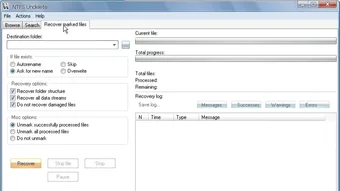
NTFS Undelete: File Recovery Utility NTFS Undelete is a free file recovery application designed for Windows users. Whether you've accidentally deleted important files or lost them due to system errors, NTFS Undelete offers a solution to retrieve them. The program provides three versatile recovery options: an installation package for recovering files from different drives, an ISO image for CD/DVD recovery, and portable executables in a ZIP archive for on-the-go use. It's crucial to note that when using NTFS Undelete, saving the recovered files in a separate location is advisable to prevent potential damage to the originals. The software supports file masks for faster searches and features an advanced search mode for precise filtering based on file attributes like size and creation date. You may also like 4.7 Free ZArchiver Simplify file management 5 Free PDF Reader & Viewer PDF Reader & Viewer 3.8 Trial version Teracopy File copying and management PC utility

Guides & Tutorials for NTFS Undelete

How to install NTFS Undelete
  1. Click the Preview / Download button above.
  2. Once redirected, accept the terms and click Install.
  3. Wait for the NTFS Undelete download to finish on your device.
How to use NTFS Undelete

This software is primarily used for its core features described above. Open the app after installation to explore its capabilities.

User Reviews for NTFS Undelete 0

    No reviews found

Similar Apps




